

Your First ETF Purchase: From Deposit to Record
You have an account and a portfolio in mind. Now learn the order of operations: funding, checking the ticker, reading the quote, market versus limit orders, confirming the fill, and keeping a record.
- Published
- 2026-11-10
- Last verified
- 2026-11-10
- Recheck by
- 2027-01-20
- Reading time
- 9 min read
- Revision
- rev.1
- Editorial approval
- Approved 2026-11-10
Co-authored and managed by John Park and his team of AI agents, orchestrated by AXE.
TL;DR A first purchase is not hard, but the order matters. Confirm the money is in the right account as available cash, then match the ticker and exchange against the fund company's own page. Read the bid, the ask and the spread between them. For most beginners a limit order, where you set the price, is the easier order to control. After the fill, write it down. This lesson does not recommend any product or platform, and 'XYZ' in the figures is a made-up ETF.
If Lesson 5 helped you decide what portfolio to hold, what is left is pressing the buy button. The first time, an order screen full of unfamiliar numbers can feel tense. Once you know the sequence, though, it becomes the same short routine every time. The seven steps below apply in a similar way on most Canadian online brokerages. Screen labels and menu locations differ by platform.
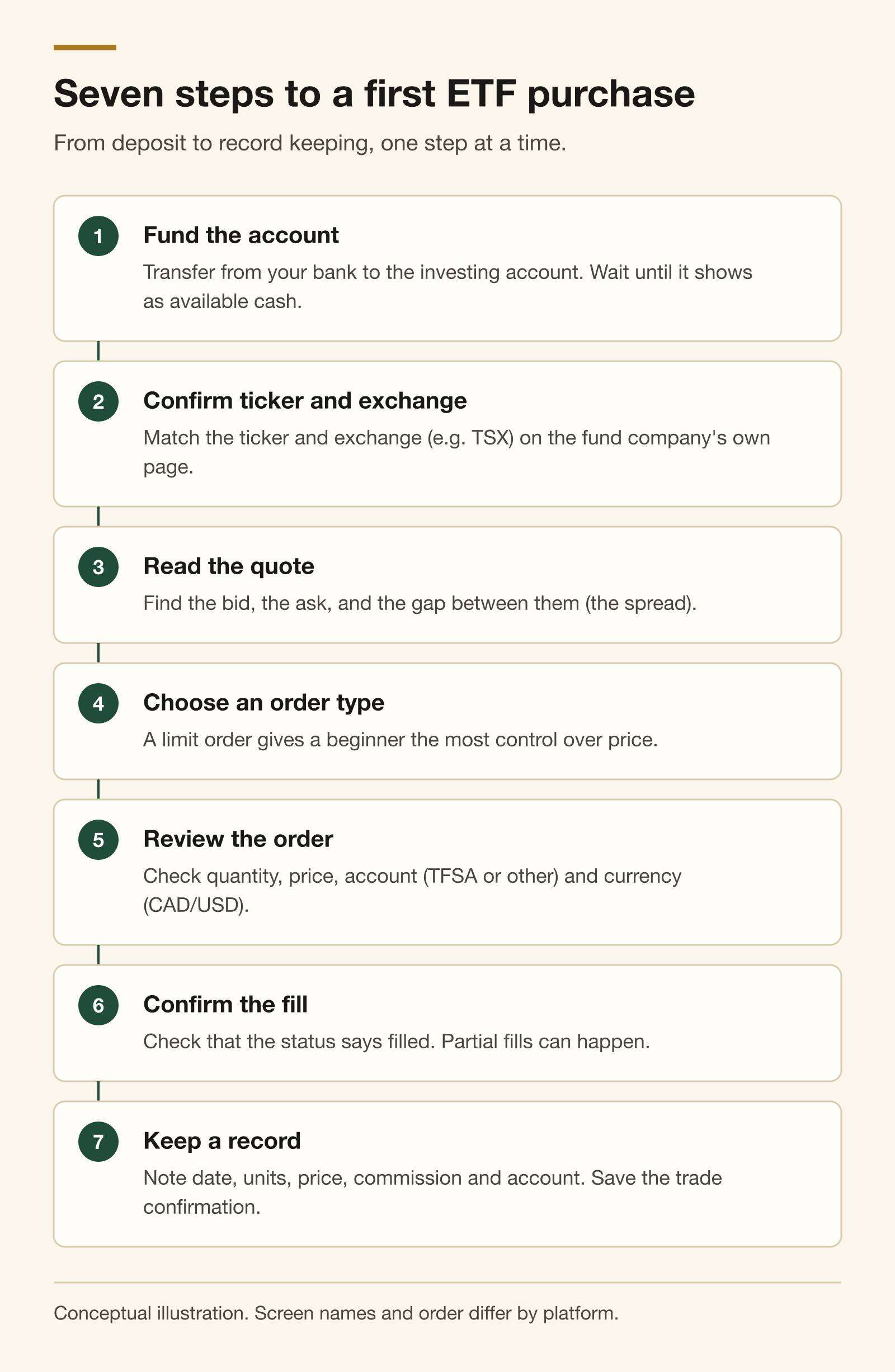 Seven steps to a first ETF purchase. From deposit to record keeping, one step at a time.
Figure 1. Seven steps to a first ETF purchase. Conceptual; the actual screen order differs by platform.
1. Fund the account and wait for available cash
The first step is moving money from your bank to your investing account. Depending on the transfer method, money can appear in the account before you are able to use it. Look for a line such as buying power or available cash.
- Check which account you funded. Money meant for a TFSA that lands in a non-registered account is taxed differently. Confirm it matches the account you chose in Lesson 3.
- Check your contribution room. Registered accounts such as the TFSA, RRSP and FHSA have limits, and going over can trigger penalties. CRA My Account shows room, but it may not reflect this year's activity right away, so keep your own record too.
- Check the currency. Is this the Canadian dollar (CAD) side or the US dollar (USD) side? The Canadian-listed asset allocation ETFs from Lesson 5 generally trade in CAD.
2. Confirm the ticker and the exchange
A ticker is the short code an exchange uses for a security. Typing it into a search box can return several look-alikes.
- The same letters on a different exchange can be a completely different product. Canadian-listed funds are usually on the TSX (Toronto Stock Exchange).
- Some ETFs offer separate CAD and USD trading units of the same fund, sometimes marked with a suffix such as '.U'.
- The safest habit is to compare the ticker, exchange and full fund name on the fund company's official page with what your platform shows, one by one.
3. Read the quote: bid, ask and spread
Order screens usually show three prices.
- Bid: the highest price someone is currently offering to pay. If you sell, you will generally sell near here.
- Ask: the lowest price someone is currently willing to sell at. If you buy, you will generally buy near here.
- Spread: the gap between ask and bid. It does not appear on a fee schedule, but it is part of what a trade really costs.
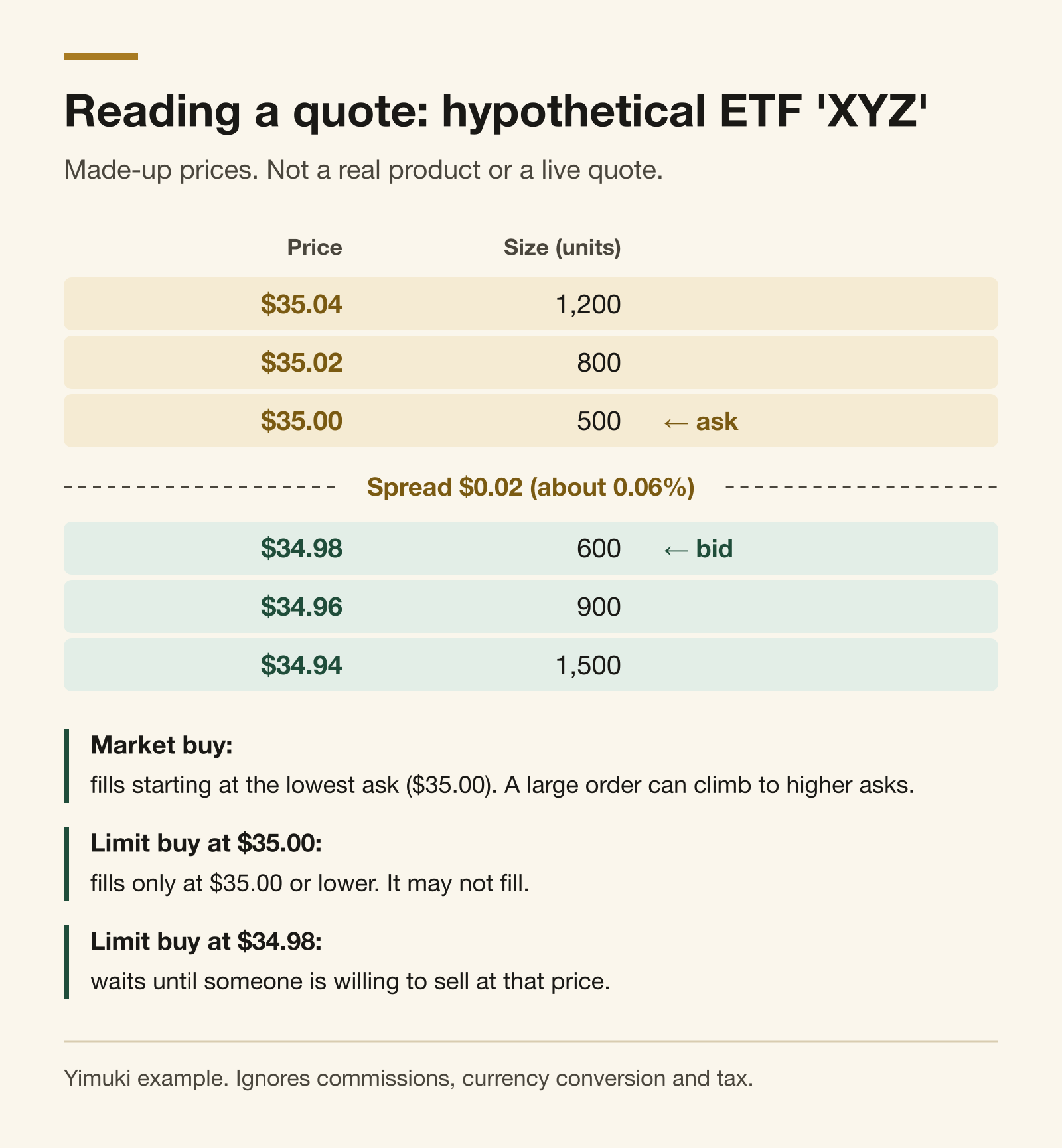 Reading a quote: hypothetical ETF 'XYZ'. Made-up prices. Not a real product or a live quote.
Figure 2. Order book for a hypothetical ETF 'XYZ'. Prices are invented and are not a live quote.
The last price is a trade that already happened. The price you can buy at right now is the ask, so get used to looking at bid and ask rather than last.
Large, heavily traded ETFs usually have narrow spreads. Thinly traded ETFs, and the first and last minutes of the trading day, can show wider spreads. That is why general order-execution guidance suggests avoiding the minutes right after the open and right before the close. Regular TSX trading runs from 9:30 a.m. to 4:00 p.m. Eastern time, which is 6:30 a.m. to 1:00 p.m. for readers in British Columbia.
4. Order types: market versus limit
| Order type | How it fills | Advantage | Watch out for |
|---|---|---|---|
| Market | Immediately, at the best price currently available | Almost certain to fill | You cannot set the price. With a wide spread or a fast market, you may pay more than expected |
| Limit | Only at your price or better | You control the price | It may not fill if the market never reaches your price |
For most beginners, a limit order is more predictable. A common approach is to set the limit at the current ask, or a cent or two above it. The order is then likely to fill right away, while still protecting you from paying far more if the price jumps.
You will also choose how long the order lasts. A Day order disappears at the close if unfilled; a GTC (good till cancelled) order stays open for a set period. Day orders are simpler to manage at first. Other order types exist, such as stop orders, but they are often unnecessary when you are starting a long-term diversified plan.
How many units can you buy?
Divide your available cash by your limit price and drop the decimals. With $500 and an ETF at $35.00, you can buy 14 units ($490) and keep $10 as cash. If your platform charges a commission, subtract it first. Some platforms allow fractional shares, buying less than one whole unit, but availability and terms vary.
5. Review the order
On the order confirmation screen, check these once more. Typing one wrong digit is more common than people think.
- Buy or Sell
- Ticker and exchange
- Number of units and limit price
- Which account (TFSA, RRSP, FHSA, non-registered and so on)
- Currency (CAD or USD), estimated total cost and commission
6. Confirm the fill and note the settlement date
After placing the order, check that its status changes to filled. A partial fill, where only some units are bought, can also happen. If your limit was not reached, you can wait, adjust the price or cancel.
The day your order fills is the trade date. The settlement date, when cash and units actually change hands, has been one business day after the trade (T+1) in both Canada and the US since May 2024. Some tax calculations use the settlement date, so record both.
7. Keep a record
After the fill, your platform issues a trade confirmation, often by email or in an in-app documents folder. Save it and copy the key details into a simple log. This makes Lesson 8's work on costs and taxes much easier. In a non-registered account especially, you will need your adjusted cost base (ACB) when you eventually sell, so start the habit now.
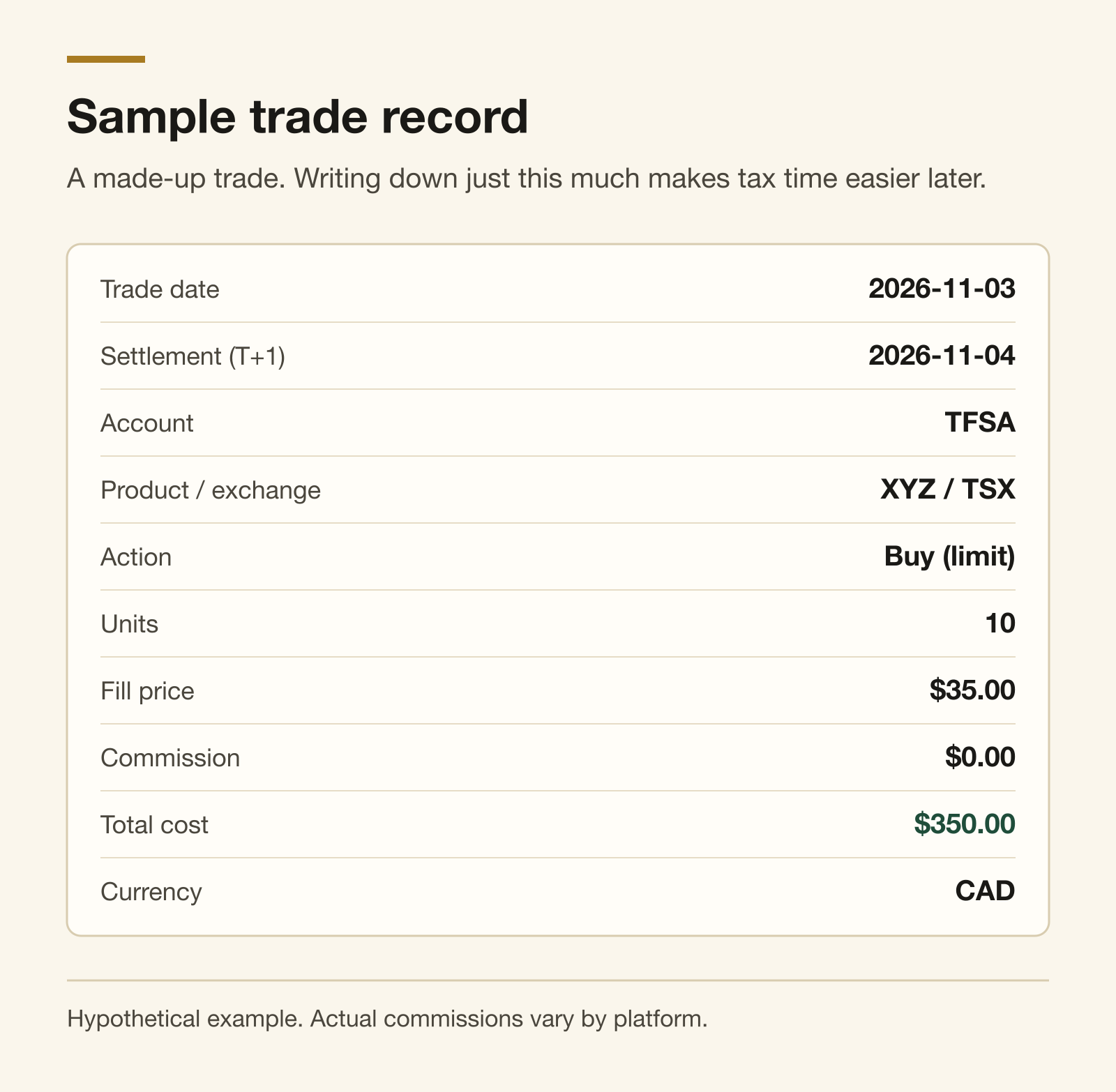 Sample trade record. A made-up trade. Writing down just this much makes tax time easier later.
Figure 3. Sample trade record. Hypothetical trade; actual commissions vary by platform.
Common beginner mistakes
- Placing a market order after the close. It may fill at the next open, at a price that can be quite different. A limit order during market hours is more predictable.
- Ordering off the last price. The price you can buy at now is the ask.
- Buying in the wrong account. A purchase meant for your TFSA that happens in a non-registered account has different tax results.
- Not noticing an automatic currency conversion. Buying a US-listed product from a CAD account can trigger a conversion with its own cost. Lesson 8 covers FX costs.
- Checking every day after the first buy. Prices move daily. As Lesson 2 showed, watching often can lead to trading often.
The strongest counterargument
"Is this much care really needed? For a big ETF, a market order costs a few cents more at most." That is usually true. Buying a small amount of a heavily traded ETF during market hours, the difference between market and limit is often tiny.
The limit-order habit, though, is less about saving cents and more about preventing mistakes. A mistyped quantity, a thinly traded product or a fast-moving day can turn a market order into a surprisingly expensive one. Following the same routine every time keeps the outcome predictable even on those days.
First-purchase checklist
- The money is in the right account and shows as available cash
- For registered accounts, I checked my remaining contribution room
- I matched the ticker, exchange and currency with the fund company's page
- I looked at the bid, the ask and the spread
- I set a limit price, a quantity and a Day duration
- On the confirmation screen I re-checked the account, Buy/Sell and total cost
- I confirmed the fill and noted the settlement date
- I saved the trade confirmation and copied it into my log
Next: In Lesson 7 you will turn this purchase into a monthly routine with an automatic contribution plan.
Sources
- Ontario Securities Commission / GetSmarterAboutMoney, "How to buy and sell stocks": https://www.getsmarteraboutmoney.ca/learning-path/stocks/how-to-buy-and-sell-stocks/
- CIRO, "Amendments to UMIR and IDPC Rules to facilitate the investment industry's move to T+1 settlement": https://www.ciro.ca/newsroom/publications/amendments-umir-and-idpc-rules-facilitate-investment-industrys-move-t1-settlement
- Ontario Securities Commission / GetSmarterAboutMoney, "How Exchange-Traded Funds (ETFs) work": https://www.getsmarteraboutmoney.ca/learning-path/etfs/how-exchange-traded-funds-etfs-work/
- TMX Group, "Trading Hours": https://www.tsx.com/trading/calendars-and-trading-hours/trading-hours
- Canada Revenue Agency, "Tax-Free Savings Account (TFSA)": https://www.canada.ca/en/revenue-agency/services/tax/individuals/topics/tax-free-savings-account.html
- Canada Revenue Agency, "Calculating and reporting your capital gains and losses": https://www.canada.ca/en/revenue-agency/services/tax/individuals/topics/about-your-tax-return/tax-return/completing-a-tax-return/personal-income/line-12700-capital-gains/calculating-reporting-your-capital-gains-losses.html
- Canadian Securities Administrators (via BCSC), "Canadian securities regulators announce move to T+1 settlement cycle": https://www.bcsc.bc.ca/about/media-room/news-releases/2024/47-canadian-securities-regulators-announce-move-to-tplus1-settlement-cycle
Disclaimer: This content is provided for general informational and educational purposes only. It is not investment, financial, tax, or legal advice. Yimuki Markets is not a registered investment adviser. All investing involves risk, including possible loss of principal. Consider your circumstances and consult a qualified professional before making financial decisions.
Publication gate
BLOCKED_PUBLICATION: Requires John's exact-revision approval plus Canadian legal, tax, investment, and Korean-language review. All dated claims must be rechecked within seven days of publication.
Co-authored and managed by John Park and his team of AI agents, orchestrated by AXE.
Sources
- getsmarteraboutmoney.cahttps://www.getsmarteraboutmoney.ca/learning-path/stocks/how-to-buy-and-sell-stocks/
- ciro.cahttps://www.ciro.ca/newsroom/publications/amendments-umir-and-idpc-rules-facilitate-investment-industrys-move-t1-settlement
- getsmarteraboutmoney.cahttps://www.getsmarteraboutmoney.ca/learning-path/etfs/how-exchange-traded-funds-etfs-work/
- tsx.comhttps://www.tsx.com/trading/calendars-and-trading-hours/trading-hours
- canada.cahttps://www.canada.ca/en/revenue-agency/services/tax/individuals/topics/tax-free-savings-account.html
- canada.cahttps://www.canada.ca/en/revenue-agency/services/tax/individuals/topics/about-your-tax-return/tax-return/completing-a-tax-return/personal-income/line-12700-capital-gains/calculating-reporting-your-capital-gains-losses.html
- bcsc.bc.cahttps://www.bcsc.bc.ca/about/media-room/news-releases/2024/47-canadian-securities-regulators-announce-move-to-tplus1-settlement-cycle
Korean original
Read the Korean original at /articles/first-etf-purchase-step-by-step-ko →